Volume booster extension alternative: when you need a louder file
A volume booster extension alternative makes sense when other people must hear the louder sound. Extensions such as Volume Master boost a Chrome tab on your own speakers only. So if you need to send, post or upload the video, use a file tool that saves a new, louder copy instead.
By The Loudmend team (Product and testing). Last updated .
Volume booster extension alternative: side by side
We read each public page on October 28, 2026. So where a page does not state a fact, the table says so.
| Volume Master extension | Volume Booster extension | Our file tool | |
|---|---|---|---|
| What it changes | Sound playing in a Chrome tab | Audio from any Chrome tab | The sound track inside the file |
| Who hears the boost | Only you, on this browser | Only you, on this browser | Anyone you send the file to, on any player |
| Saves a louder file | Not stated | Not stated | Yes, in the same format as the original |
| Max boost | 600% | 1000% | 300% free, 1000% with credits |
| Clipping guard | Not stated; voice and bass boost | None stated; the page warns of crackling on small speakers | -1 dB peak limiter, on by default |
Volume booster extension alternative: formats, install and price
| Volume Master extension | Volume Booster extension | Our file tool | |
|---|---|---|---|
| Loudness target | No | No | -14, -16, -11 or -23 LUFS, plus Voice lift |
| Formats | Any tab playing audio | Any tab playing audio | MP4, MOV, M4V, MKV, WebM; MP3, WAV, M4A, AAC, FLAC, OGG, OPUS |
| Install | Chrome Web Store extension | Chrome Web Store extension | None; the first video loads a 31 MB engine once |
| Full screen | Chrome keeps a tab icon visible while it changes sound | Not stated | Not affected; the file plays anywhere |
| Price | Free, no ads | Free | 3 free exports a day; $4.99 for 25 exports |
| Users and rating | 7,000,000 users, 4.8 from 49.6K ratings | 3,000,000 users, 4.7 from 4.7K ratings | New tool, no store rating |
What a volume booster extension actually does
A volume booster extension changes the sound inside one browser tab. For example, Volume Master raises any Chrome tab up to 600%, and it adds voice and bass boost. Volume Booster goes up to 1000% on audio from any tab. Both store pages say the extension is free, and they list 7 million and 3 million users.
However, the boost happens only while the tab plays. The extension sits between the tab and your speakers, so the video file itself never changes. Neither store page says it can save a louder copy, which is why people look for a volume booster extension alternative. As a result, if you download the video or send it to a friend, it plays just as quietly as before.
When an extension is enough
An extension is the right pick when you are the only listener. Say a lecture or a meeting recording plays too softly on laptop speakers. In that case, you just want it louder right now, on your own screen. A free extension does that in a second, and you never touch a file.
Also, an extension works across many sites at once. You set the level per tab instead of fixing each video. So for watching, an extension or the player's own volume setting is enough, and our tool would be the wrong choice.
Still, keep an eye on the level. The Volume Booster page warns that small speakers crackle past a quarter of the slider. In addition, the Volume Master page notes that Chrome keeps a blue icon in view, so true full screen is not possible while it changes the sound.
When you need a volume booster extension alternative
You need a different tool once someone else will hear the video. For example, a teacher sends a lesson clip to a class, or a creator posts a quiet interview to TikTok. Each viewer then hears the file as it is, on their own phone. Your extension does nothing for them.
That is where a volume booster extension alternative comes in. A file tool writes the louder sound into a new copy of the video, so the boost travels with it. The same goes for a clip you post to YouTube or Instagram, attach to an email or hand to an editor. Similarly, a voice memo or MP3 you share needs the boost inside the file.
How our tool makes a louder file
First, drop the video into the page and press play. You hear the boost live in the browser before anything leaves your device. Next, pick Boost, Normalize or Voice lift. Boost raises the sound by a set amount, while Normalize hits a target such as -14 LUFS for streaming or -16 LUFS for voice.
After that, export. Our tool copies the sound track out of the video and sends only that track to our server. Then it puts the louder sound back next to the untouched picture. So the picture keeps its full quality, and you skip a long render. Our server deletes its copy within 30 minutes.
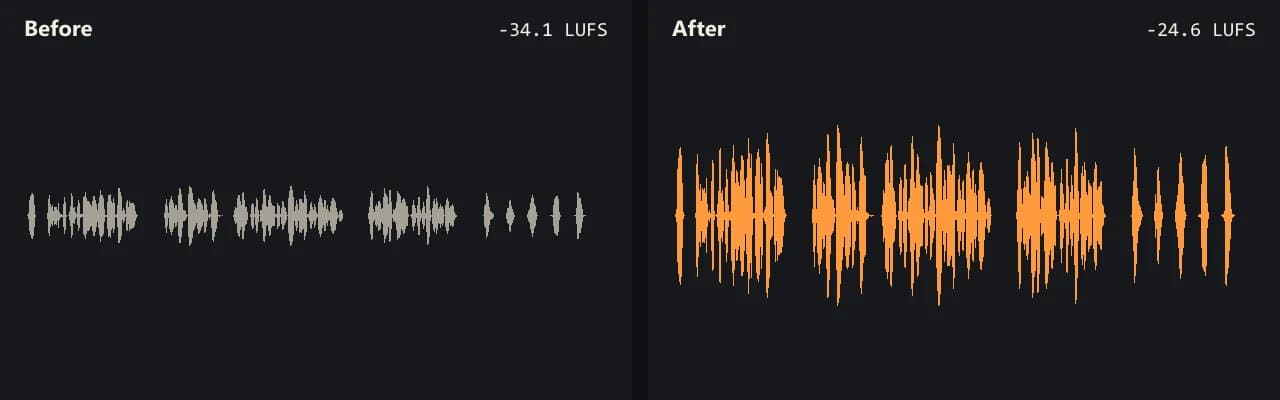
Finally, check the numbers. The tool shows loudness and peak before and after each export. For example, our quiet test interview at -34.2 LUFS came out at -24.7 LUFS with a 300% boost.
Limits of this volume booster extension alternative
Our volume booster extension alternative is not always the better choice. It counts exports, while both extensions are free with no cap stated on their pages. You get 3 free exports a day, sound up to 10 minutes long and a boost up to 300%. After that, credits start at $4.99 for 25 exports, and they never expire.
Also, a louder file cannot repair sound that already clipped. Loud background noise rises along with the voice, since noise removal is a different job. In addition, videos with two sound tracks come back with the first track only. Finally, phones have less memory than computers, so keep phone videos under about 500 MB.
Volume booster extension alternative FAQ
What is the best volume booster extension alternative?
Yes. When others must hear the louder sound, use a file tool that saves a new, louder copy of the video. When only you listen, the player volume or an extension is enough.
Does a volume booster extension make the video file louder?
No. Neither store page we read says the extension saves a file. The extension boosts the sound while the tab plays, so a downloaded or shared copy stays as quiet as before.
Is a volume booster extension safe?
The Chrome Web Store says both extensions we checked follow its recommended practices. Your speakers are the bigger risk, though. For example, the Volume Booster page warns of crackling past a quarter of the slider on small speakers.
Why does Volume Master stop full screen?
Chrome keeps a blue icon in the tab bar whenever an extension changes sound, per the Volume Master page. Pressing F11 on Windows or Ctrl+Cmd+F on a Mac improves it, the page says.
Is Volume Master free?
Yes. Its Chrome Web Store page says it is completely free and has no ads. It boosts any tab up to 600%.
How do I make a video louder than max volume?
For your own screen, an extension boosts past 100%. For a file you share, raise the sound inside it. With our tool, 300% adds about 9.5 dB, and a peak limiter keeps loud parts clean.
How do I make a video louder on TikTok?
Make the file louder before you post it. Our tool has a -11 LUFS target for loud social clips. An extension only changes what you hear, so it cannot help your viewers.
Does a volume booster extension alternative need an install?
No. Our tool runs in the browser, and the first video loads a 31 MB engine once. Drop the video in, press play to hear the boost, then export the same format, only louder.