Video volume booster that changes the file
This video volume booster makes the file louder, not just your speaker. Drop a video, pick a boost from 100% to 1000%, listen in the browser, then export a louder copy in the same format. A peak guard keeps loud parts clean, and you can try it free 3 times a day.
By The Loudmend team (Product and testing). Last updated .
How to use the video volume booster, step by step
Open this page in any browser and drop your video in the box.
Pick a mode: Boost for a set amount, Normalize for a target, or Voice lift for speech.
Play the clip to hear the result live before you export.
Keep the clipping guard on unless you want raw gain.
Export, then send or post the louder copy like any other video.
The first 3 runs each day are free. After that, see the pricing page for packs and plans, or read how we test the tool.
Video volume booster tested on a real quiet file
We ran this page's own test file through the same engine you use, with the settings the tool opens with. So the waveform and the numbers below are exactly what came back, measured the EBU R128 way.
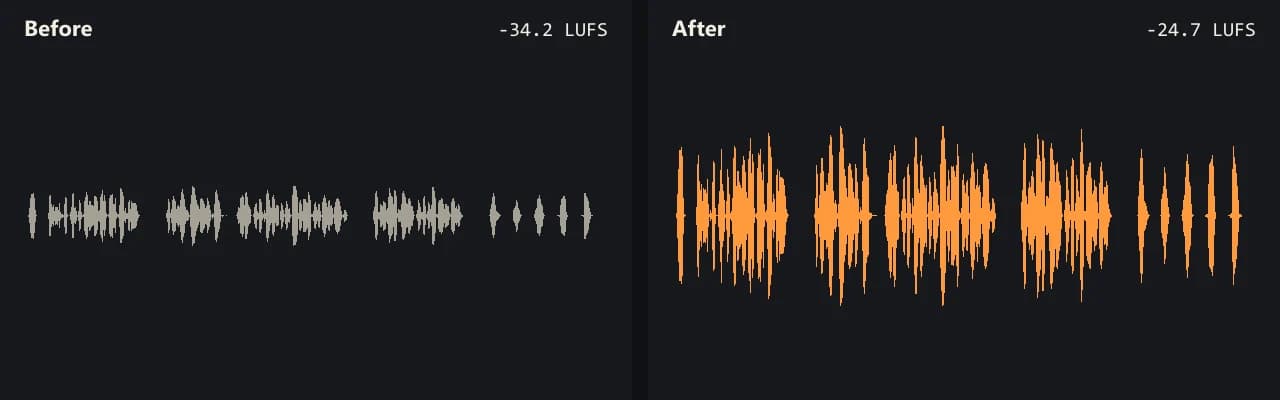
Same clip, same moment: switch while it plays. The after version is much louder, so start with your volume low.
- Test file
- quiet-interview.mp4 (20 s voice clip, 1280x720)
- Export
- Boost 300%, AAC 192 kbps
- Loudness before
- -34.2 LUFS
- Loudness after
- -24.7 LUFS
- Peak before
- -14.5 dB
- Peak after
- -5 dB
- Change
- +9.5 dB
- Server time
- 1.3 s
How we test: every guide runs its own quiet test file that we recorded ourselves, and we listen to each export. More on the about page.
Three kinds of video volume booster
Search for a booster and you get three very different things. First, there are browser extensions. They raise the sound of a tab while you watch, so a quiet stream on your laptop gets louder. However, the video file never changes.
Second, there are phone apps and APK downloads. Most of them push the phone's own output harder. That helps you hear a clip on that phone, but your friend still gets the quiet version when you share it.
Third, there are file tools like this one. They write a new copy of the video with a louder sound track. So the fix travels with the file to YouTube, a class portal, a group chat or an email.
What our video volume booster does to the file
The trick is that the picture never gets rebuilt. Your browser copies the sound track out of the video, and only that sound goes to our server. Then the louder sound comes back and sits next to the untouched picture.
Because the picture is copied bit for bit, it keeps every pixel. There is also no long render, since only the sound is new. The sound comes back as AAC 192 kbps, or Opus 160 kbps for WebM.
Privacy follows from the same design. We never get your picture, and the server copy of the sound is gone within 30 minutes.
Boost, Normalize or Voice lift
Boost is the plain volume knob. You choose a number, such as 200% for about +6 dB or 500% for about +14 dB. It suits clips that are a bit quiet all the way through.
Normalize is better when you have several clips that should match. It measures loudness in LUFS and then aims for a target, for example -14 LUFS for most streaming or -16 LUFS for voice. In our test, a quiet interview went from -34.2 to -15.1 LUFS this way.
Voice lift is for talking. It trims low rumble, raises soft words more than loud ones and then settles at -16 LUFS. So a speaker who drifts away from the mic stays easy to follow.
When this is not the right choice
A booster only adds gain. So if the original already crackles from clipping, the crackle stays. Likewise, hiss and room noise rise together with the voice.
If you just want a louder tab for yourself, an extension is simpler. Also, videos with more than one sound track come back with only the first track, and very large files may not fit in a phone browser.
What each kind of booster changes
| Booster type | What gets louder |
|---|---|
| Browser extension | Playback in one tab; the file stays the same |
| Phone booster app | Output on that phone; shared copies stay quiet |
| This online tool | A new copy of the file, louder for everyone |
| Free use | 3 exports a day, boost up to 300%, no watermark |
| With credits | Boost up to 1000%, sound up to 3 hours |
| Peak control | Clipping guard holds peaks at -1 dB |
Video volume booster FAQ
Is there a free video volume booster online?
Yes, this one. You get 3 free exports a day with no account and no watermark. Free runs boost up to 300% and take sound up to 10 minutes long.
Do I need to download a video volume booster app?
No. It runs in your browser, so there is no APK or installer. The engine loads once, about 31 MB, the first time you use a video.
Does a Chrome volume booster extension change the video?
No. An extension only raises playback in your browser. When you share the file, it is still as quiet as before.
Can I use the video volume booster on MP3 files?
Yes. Audio files such as MP3, WAV, M4A, FLAC and OGG work too, and they come back in the same format. MP3 comes back at 256 kbps.
How loud can I go before it distorts?
With the clipping guard on, peaks stay at -1 dB, so even 1000% does not clip. Still, a huge boost also raises hiss, so listen before you export.
Will the booster add a watermark?
No. Free and paid exports both come back clean. When the free runs are used up, you get a short preview of the louder sound instead of the file.
Related guides
Try it on your own file
Three exports a day are free. Your video stays in the browser; only the sound track is processed.