Make iPhone video louder in Safari
To make an iPhone video louder, open this page in Safari, tap the box and pick the clip from your library. Choose a boost, listen, and export a louder copy. The Photos app has no volume boost, and iMovie only lets you set clip volume inside a project. Here, the picture stays untouched.
By The Loudmend team (Product and testing). Last updated .
How to make an iPhone video louder, step by step
Open this page in Safari on your iPhone.
Tap the drop box, then pick the video from your photo library.
Choose Boost at 200%, or Voice lift if the clip is mostly talking.
Play it with the speaker on to hear the new level.
Export, then save the download and move it back to Photos from the Files app.
The first 3 runs each day are free. After that, see the pricing page for packs and plans, or read how we test the tool.
Make iPhone video louder tested on a real quiet file
We ran this page's own test file through the same engine you use, with the settings the tool opens with. So the waveform and the numbers below are exactly what came back, measured the EBU R128 way.
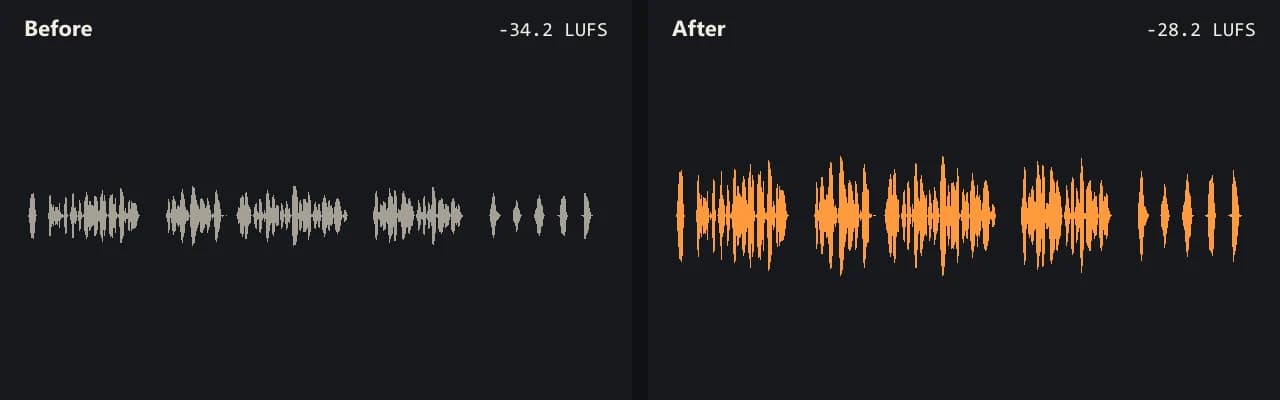
Same clip, same moment: switch while it plays. The after version is much louder, so start with your volume low.
- Test file
- quiet-interview.mp4 (20 s voice clip, 1280x720)
- Export
- Boost 200%, AAC 192 kbps
- Loudness before
- -34.2 LUFS
- Loudness after
- -28.2 LUFS
- Peak before
- -14.5 dB
- Peak after
- -8.5 dB
- Change
- +6 dB
- Server time
- 1.3 s
How we test: every guide runs its own quiet test file that we recorded ourselves, and we listen to each export. More on the about page.
Can you make an iPhone video louder in Photos?
Not really. The Photos app lets you trim a clip, crop it and add filters, but it has no volume boost. The side buttons only change how loud your phone plays. So the file stays just as quiet when you text it or post it.
That is why a quiet clip still sounds quiet on a friend's phone. To fix it for everyone, the sound track inside the file has to get louder.
Make an iPhone video louder with iMovie
Apple's free iMovie app has a volume control for each clip. According to Apple's iMovie guide, you open a movie project, tap the clip in the timeline, tap the Audio button and then drag the volume slider. You can also mute a clip there.
This works well when you are editing anyway. However, it takes a few more steps. You need a project, and then you share a new movie from it, so the whole video goes through an export. Also, Apple's guide does not say how far the slider goes above the original level.
If you only want the same clip with louder sound, the browser route below is shorter.
Make an iPhone video louder in Safari
This page runs in Safari with no app to install. When you pick a clip, the browser copies its sound track out and leaves the picture alone. Then only the sound goes to our server and comes back louder. Finally, Safari joins the louder sound with the original picture.
iPhone clips are MOV or MP4, with HEVC or H.264 inside. Both work, because the picture is copied rather than decoded. As a result, a 4K HEVC clip keeps its exact quality.
Phones have less memory than laptops, though. So keep the clip under about 500 MB. For a longer video, AirDrop it to a Mac and use this page there, where files up to 2 GB work.
When this is not the right choice
Some iPhone sound problems are not about the file at all. For example, if a video plays too softly while you are on a FaceTime call, that is a phone setting. A louder file will not change it.
Also, gain cannot fix wind noise or a clip that already crackles. The noise and the crackle both rise with the voice. In those cases, try to record again closer to the person speaking.
Ways to make iPhone video louder
| Where | What it can do |
|---|---|
| Photos app | Trim, crop and filters, but no volume boost |
| Side volume buttons | Louder playback on this phone only |
| iMovie | Volume slider per clip inside a project, then export |
| This page in Safari | A louder copy, picture copied as is |
| Camera format High Efficiency | HEVC video, works here |
| Camera format Most Compatible | H.264 video, works here |
| Phone file size | Keep it under about 500 MB |
Make iPhone video louder FAQ
Can you make an iPhone video louder?
Yes, but not in Photos. Use iMovie inside a project, or open this page in Safari and export a louder copy of the clip.
How do I make iPhone video audio louder without an app?
Open this page in Safari, pick the clip and export. Nothing gets installed, and you get 3 free exports a day.
Why are my iPhone videos so quiet?
Usually the phone was far from the person talking, or a case covered a mic. The recording level is then low, and a boost or Voice lift can bring it up.
Will this make the iPhone video blurry?
No. The picture is copied bit for bit and never gets encoded again. Only the sound changes.
Does it work with HEVC iPhone videos?
Yes. HEVC and H.264 both work, in MOV or MP4, since the tool does not decode the picture.
How do I make a video louder than a call on iPhone?
That depends on how the phone mixes call audio, so a louder file will not help much. This tool is for clips you send or post.
Where does the louder iPhone video go?
Safari saves it as a download. From the Files app, you can share it or save it to Photos.
Related guides
Try it on your own file
Three exports a day are free. Your video stays in the browser; only the sound track is processed.