Make MOV louder without converting it
To make a MOV louder, drop the file above, choose Boost at 200% or 300%, listen, and export. You get a MOV back, not an MP4. The QuickTime picture track, HEVC or H.264, is copied bit for bit, and only the sound gets louder, as AAC at 192 kbps.
By The Loudmend team (Product and testing). Last updated .
How to make a MOV louder, step by step
Find the MOV on your Mac, PC or phone and drop it on the box above.
Select Boost and start with 200%, or pick Normalize for a set loudness.
Play a few seconds to judge the level by ear.
Export the file and keep the clipping guard on.
Open the new MOV in QuickTime Player or Photos to check it.
The first 3 runs each day are free. After that, see the pricing page for packs and plans, or read how we test the tool.
Make MOV louder tested on a real quiet file
We ran this page's own test file through the same engine you use, with the settings the tool opens with. So the waveform and the numbers below are exactly what came back, measured the EBU R128 way.
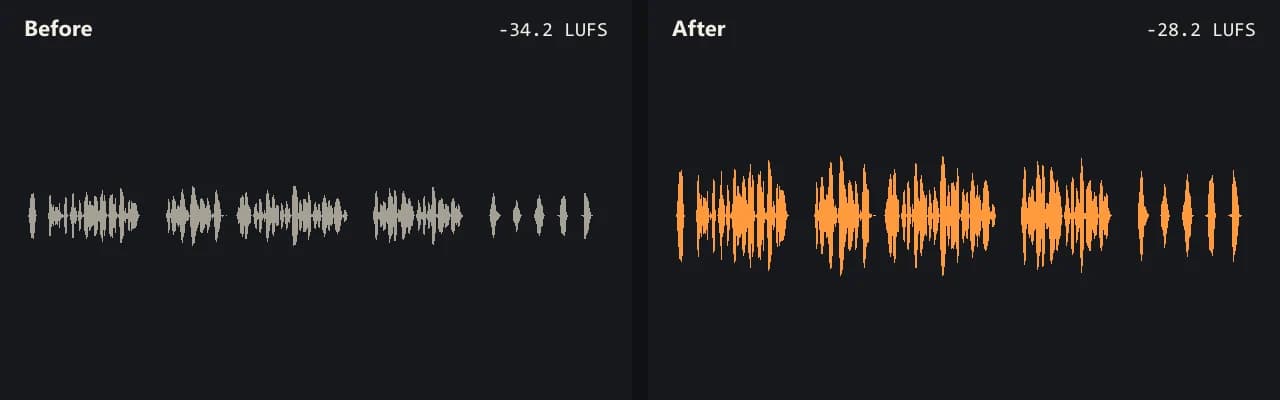
Same clip, same moment: switch while it plays. The after version is much louder, so start with your volume low.
- Test file
- quiet-interview.mp4 (20 s voice clip, 1280x720)
- Export
- Boost 200%, AAC 192 kbps
- Loudness before
- -34.2 LUFS
- Loudness after
- -28.2 LUFS
- Peak before
- -14.5 dB
- Peak after
- -8.5 dB
- Change
- +6 dB
- Server time
- 1.3 s
How we test: every guide runs its own quiet test file that we recorded ourselves, and we listen to each export. More on the about page.
What a MOV file is
MOV is the QuickTime file format from Apple. iPhones usually save video as MOV, and so do many Macs and cameras. Inside, a MOV holds a picture track and one or more sound tracks, much like an MP4.
On an iPhone, the picture inside is usually HEVC, also called H.265. That is the High Efficiency setting under Camera, then Formats. If someone picked Most Compatible instead, new videos use H.264. Either way, the sound is often the quiet part, because the phone sat far from the person talking.
How to make a MOV louder without converting it
Many online tools first turn a MOV into an MP4. That step encodes the picture again, so it takes time and the image loses a little detail. This tool skips it.
Instead, your browser copies the sound track out of the MOV and leaves the picture alone. Then only the sound goes to our server, where it gets louder. Finally, the browser writes a new MOV with the original picture and the louder sound.
Since the picture never gets decoded, HEVC and H.264 both work the same. Also, the server copy of the sound is gone within 30 minutes, and the picture never leaves your device.
Make a MOV louder for a post, a class or a client
First, think about where the file goes next. For a quick fix, Boost at 200% adds about 6 dB, and 300% adds about 9.5 dB. If the MOV goes to YouTube, Normalize at -14 LUFS matches the level that streaming services use. For a lesson or a talk, -16 LUFS is a safe pick.
If the video is mostly speech, try Voice lift. It cuts rumble below 80 Hz and raises soft words more than loud ones. For example, our own quiet voice test went from -34.1 to -17.2 LUFS with it.
After the export, the tool shows loudness and peak before and after. So you can check the change in numbers, not only by ear.
When this is not the right choice
A louder file cannot undo clipping. If the sound crackled in the original, it will crackle in the copy too. Wind and room noise also get louder along with the voice.
Some MOV files from pro cameras carry several sound tracks. In that case, only the first track comes back. Also, keep phone uploads under about 500 MB, while a desktop browser handles up to 2 GB.
Make MOV louder: what stays and what changes
| Part of the file | After the export |
|---|---|
| Container | MOV in, MOV out (no MP4 conversion) |
| iPhone picture, High Efficiency | HEVC (H.265), copied as is |
| iPhone picture, Most Compatible | H.264, copied as is |
| First sound track | Louder, written as AAC at 192 kbps |
| Extra sound tracks | Dropped |
| Largest file | 2 GB on desktop, about 500 MB on a phone |
Make MOV louder FAQ
How do I make a MOV file louder?
Drop it on the box at the top of this page, pick a boost and export. You get a louder MOV in a few seconds, with the same picture.
Do I have to convert MOV to MP4 first?
No. The tool reads MOV directly and writes MOV back. So there is no second file to manage and no picture loss.
Can I make MOV louder in QuickTime or iMovie?
Apple documents a volume slider for each clip in iMovie on iPhone, but iMovie then exports a new movie. If you want the same file with only louder sound, use this page instead.
Will the louder MOV still play on my iPhone and Mac?
It should. The picture is the same one your device made, and AAC sound plays in Apple apps.
Why is my MOV so quiet?
Most often the mic was far away, or the person spoke softly. A boost of 200% to 300% fixes that in most clips, while Voice lift helps uneven speech.
Is it free to make a MOV louder?
Yes, for 3 exports a day with boosts up to 300%. Credits allow up to 1000% and sound up to 3 hours long.
Related guides
Try it on your own file
Three exports a day are free. Your video stays in the browser; only the sound track is processed.