Make video louder on Android
To make a video louder on Android, open this page in Chrome, tap the box and pick the clip from your gallery. Set a boost such as 200%, play it, then export. You get a louder copy in the same format. The picture is copied as is, and no app or APK is needed.
By The Loudmend team (Product and testing). Last updated .
How to make a video louder on Android, step by step
Open Chrome on your Android phone and load this page.
Tap the drop box and choose the clip from your gallery or files.
Set Boost to 200%, or pick Normalize at -14 LUFS for a post.
Play the preview through the speaker or headphones.
Tap Make it louder, then find the new file in your Downloads.
The first 3 runs each day are free. After that, see the pricing page for packs and plans, or read how we test the tool.
Make video louder on Android tested on a real quiet file
We ran this page's own test file through the same engine you use, with the settings the tool opens with. So the waveform and the numbers below are exactly what came back, measured the EBU R128 way.
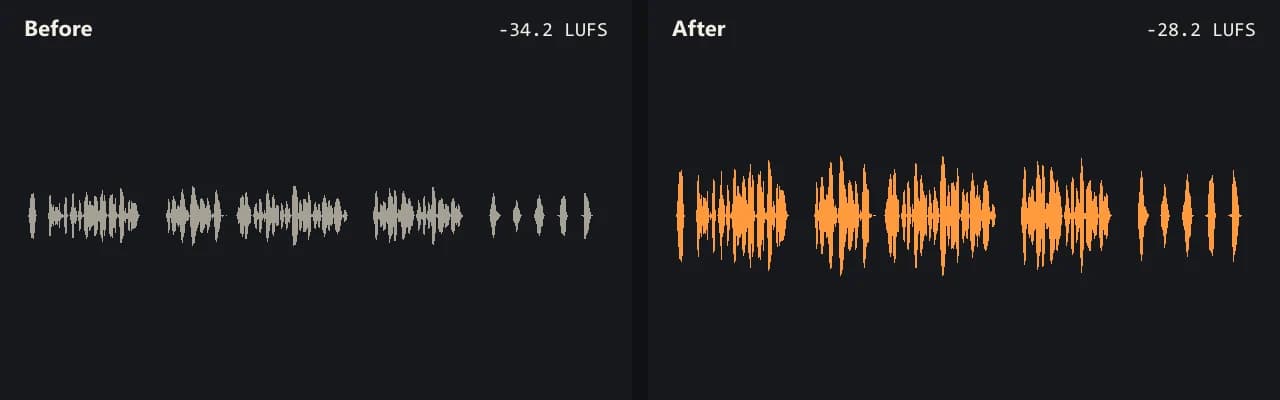
Same clip, same moment: switch while it plays. The after version is much louder, so start with your volume low.
- Test file
- quiet-interview.mp4 (20 s voice clip, 1280x720)
- Export
- Boost 200%, AAC 192 kbps
- Loudness before
- -34.2 LUFS
- Loudness after
- -28.2 LUFS
- Peak before
- -14.5 dB
- Peak after
- -8.5 dB
- Change
- +6 dB
- Server time
- 1.3 s
How we test: every guide runs its own quiet test file that we recorded ourselves, and we listen to each export. More on the about page.
What Android can do on its own
The volume rocker and the sound settings only change how loud your phone plays. They do nothing to the file. So a clip that sounds fine at full volume on your phone can still be quiet on someone else's.
Google Photos goes a step further. Its help pages show a Mute button, and on Pixel 8 and newer phones there is also an Audio Eraser. When you add music, you can balance the video audio against the song. However, Google does not describe a way to raise the clip above its recorded level.
Gallery apps from other phone makers differ by model. Most offer trim and mute, while few raise the volume of the file.
Make video louder on Android with Chrome
This page works in Chrome on Android, with nothing to install. When you pick a clip, the browser copies the sound track out of it. The picture stays on the phone and never gets decoded. Then only the sound goes to our server, and it comes back louder.
After that, the browser joins the louder sound with the original picture. Most Android cameras record MP4, so you get an MP4 back with AAC sound at 192 kbps. WebM clips stay WebM, with Opus sound.
The first video loads a 31 MB engine. So use Wi-Fi the first time if your data plan is small.
Tips to make video louder on Android phones
Phones have less memory than laptops. For that reason, keep the clip under about 500 MB. A long 4K video is better on a computer, where files up to 2 GB work.
Next, pick the mode by the content. Boost suits a clip that is quiet all the way through. Voice lift suits a talk or a vlog, because it raises soft words more than loud ones.
Finally, check the numbers after the export. The tool shows loudness and peak before and after, so you know the change is real and not only louder speakers.
When this is not the right choice
If you only want louder playback while you watch, a phone setting is enough. Also, wind noise and crackle from clipping both get louder with the voice, so a boost cannot clean them up. A clip with two sound tracks returns with only the first.
Ways to make video louder on Android
| Where | What it does |
|---|---|
| Volume rocker and sound settings | Louder playback on this phone only |
| Google Photos editor | Mute, Audio Eraser on Pixel 8+, music balance |
| This page in Chrome | A louder copy of the file, picture untouched |
| Usual Android format | MP4 in, MP4 out with AAC 192 kbps |
| Phone file size | Keep it under about 500 MB |
| Free use | 3 exports a day, boost up to 300% |
Make video louder on Android FAQ
How do I make video audio louder on Android?
Open this page in Chrome, pick the video and export with a boost. The new file plays louder on any phone, not only yours.
How to increase video volume in the Android gallery?
Most gallery apps can trim or mute a clip but not raise its level. So export a louder copy here, and it shows up in your Downloads.
Can Google Photos make a video louder?
Google's help pages describe mute and a music balance, but not a boost above the recorded level. For that, use this page.
Do I need a volume booster APK?
No. This page runs in the browser, so you do not install anything. Most booster apps only raise playback on that phone anyway.
Does it work on Samsung phones?
Yes. Open the page in Chrome on a Galaxy phone. It works there like on any Android phone, as long as the clip fits in memory.
Will my video lose quality?
No. The picture is copied bit for bit. Only the sound track is new.
Related guides
Try it on your own file
Three exports a day are free. Your video stays in the browser; only the sound track is processed.