Amplify audio online with exact gain
To amplify audio online, drop your file above and drag the Boost slider to the gain you want. 200% adds about 6 dB, and 300% adds about 9.5 dB. Press play to hear it, then export. You get the same format back, and a limiter at -1 dB keeps the loudest peaks from clipping.
By The Loudmend team (Product and testing). Last updated .
How to amplify an audio file, step by step
Drop an M4A, MP3, WAV, AAC, FLAC, OGG or OPUS file into the box above.
Drag the Boost slider. Use the table below to turn a percent into dB.
Press play to check the quiet parts and the loud parts.
Keep the clipping guard on, unless you are sure the peaks have room.
Export and download the amplified file in its original format.
The first 3 runs each day are free. After that, see the pricing page for packs and plans, or read how we test the tool.
Amplify audio online tested on a real quiet file
We ran this page's own test file through the same engine you use, with the settings the tool opens with. So the waveform and the numbers below are exactly what came back, measured the EBU R128 way.
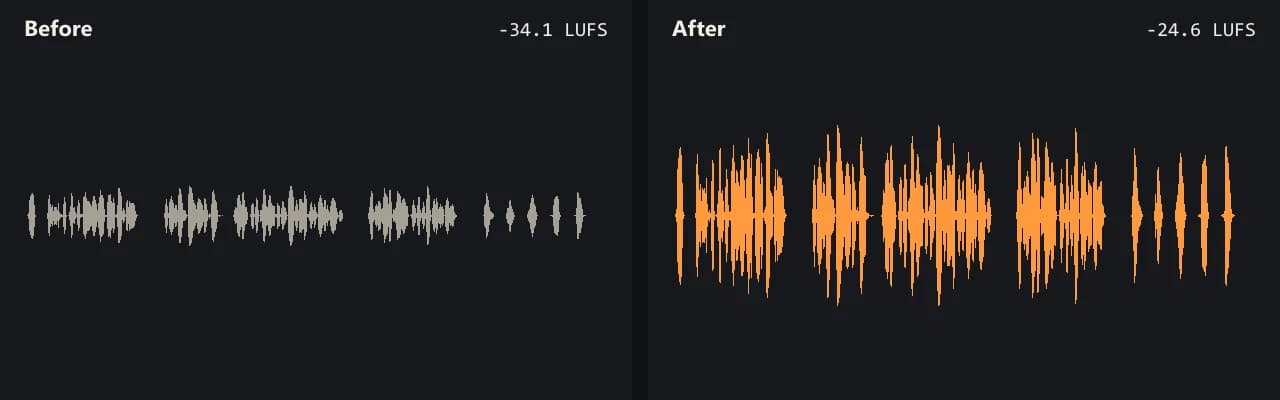
Same clip, same moment: switch while it plays. The after version is much louder, so start with your volume low.
- Test file
- quiet-voice.wav (20 s voice, mono 48 kHz)
- Export
- Boost 300%, WAV, same bit depth
- Loudness before
- -34.1 LUFS
- Loudness after
- -24.6 LUFS
- Peak before
- -14.5 dB
- Peak after
- -4.9 dB
- Change
- +9.5 dB
- Server time
- 1.0 s
How we test: every guide runs its own quiet test file that we recorded ourselves, and we listen to each export. More on the about page.
What amplify means in numbers
Amplifying multiplies the wave by a fixed factor. The slider shows that factor as a percent of the original amplitude, while most editors show it in decibels. The link between them is simple: gain in dB equals 20 times the log of the ratio.
So 200% means twice the amplitude, which is about +6 dB. Then 300% is about +9.5 dB, 500% is about +14 dB, and 1000% is +20 dB. Because the scale is logarithmic, each extra step adds less than the one before.
In practice, this makes it easy to copy a setting from another app. If an editor told you to add 9 dB, set the slider near 300% here.
Amplify audio online without clipping
Every digital file has a ceiling. When amplification pushes a peak past it, the top of the wave gets cut off, and you hear a buzz or crackle on loud words and drum hits.
That is why the clipping guard stays on by default. It is a peak limiter at -1 dB. The whole file rises by the gain you set, except for the brief peaks that would cross the ceiling, which the limiter holds back.
For example, our quiet test interview started with peaks at -14.5 dB. At 300%, it rose 9.5 dB, and the peak reached -5.0 dB, so the guard had nothing to do. The server finished the sound in about 1.4 seconds.
Amplify, normalize or voice lift?
Amplify, called Boost here, is right when you know how much louder the file should be. It adds the same gain everywhere, so the balance between loud and quiet parts stays the same.
On the other hand, Normalize is better when you know the goal level, such as -14 LUFS for streaming. It works out the gain for you. Voice lift suits speech with uneven levels, since it raises quiet words more than loud ones.
Also, M4A files from phones and voice apps work here too. They come back as AAC 192 kbps in an M4A, while WAV and FLAC stay lossless.
When amplifying will not help
Gain lifts everything at once, so hiss, hum and room noise rise with the voice. A file that already clipped keeps its distortion. And if a track only sounds quiet on your own speakers, a player volume setting is the faster fix. Use this tool when the file itself needs to be louder for someone else.
Boost percent and the gain it adds
| Boost | Gain |
|---|---|
| 100% | 0 dB (unchanged) |
| 200% | About +6 dB |
| 300% (free limit) | About +9.5 dB |
| 500% | About +14 dB |
| 1000% (with credits) | +20 dB |
| Clipping guard | Limiter at -1 dB, on by default |
Amplify audio online FAQ
How do I amplify audio online for free?
Drop the file here and export. You get 3 free exports a day, with no account and no watermark, and boosts up to 300%.
Can I amplify M4A audio online?
Yes. An M4A comes back as an M4A, with the sound encoded as AAC at 192 kbps.
How many dB is 200 percent?
About +6 dB. Doubling the amplitude adds 20 times log10 of 2, which is close to 6.02 dB.
Can I amplify audio online inside an MP4 video?
Yes. Drop the MP4 itself, and the tool raises the sound track while it copies the picture untouched.
How far can I amplify audio online?
1000%, which is +20 dB, with credits. Free runs stop at 300%, or about +9.5 dB.
Is amplify the same as normalize?
No. Amplify adds a gain you choose, while normalize picks the gain needed to reach a loudness target.
Does it change the quality when I amplify audio online?
The format stays the same. WAV and FLAC stay lossless, and lossy formats like MP3 and M4A get one new encode.
Related guides
Try it on your own file
Three exports a day are free. Your video stays in the browser; only the sound track is processed.