Make voice memo louder, even when the speaker was far away
To make voice memo louder, save the recording from the Voice Memos app as a file, then drop it into the box above. Keep Voice lift on, press play, and export. It raises quiet words more than loud ones and settles the voice at -16 LUFS. You get an M4A back that plays anywhere the original did.
By The Loudmend team (Product and testing). Last updated .
How to make a voice memo louder, step by step
In Voice Memos, open the recording, tap the share button and save it to Files.
Open this page in Safari and drop the M4A file into the box above.
Keep Voice lift on, or choose Boost if the memo is music.
Press play and listen to the faintest part.
Export and download the louder memo.
The first 3 runs each day are free. After that, see the pricing page for packs and plans, or read how we test the tool.
Make voice memo louder tested on a real quiet file
We ran this page's own test file through the same engine you use, with the settings the tool opens with. So the waveform and the numbers below are exactly what came back, measured the EBU R128 way.
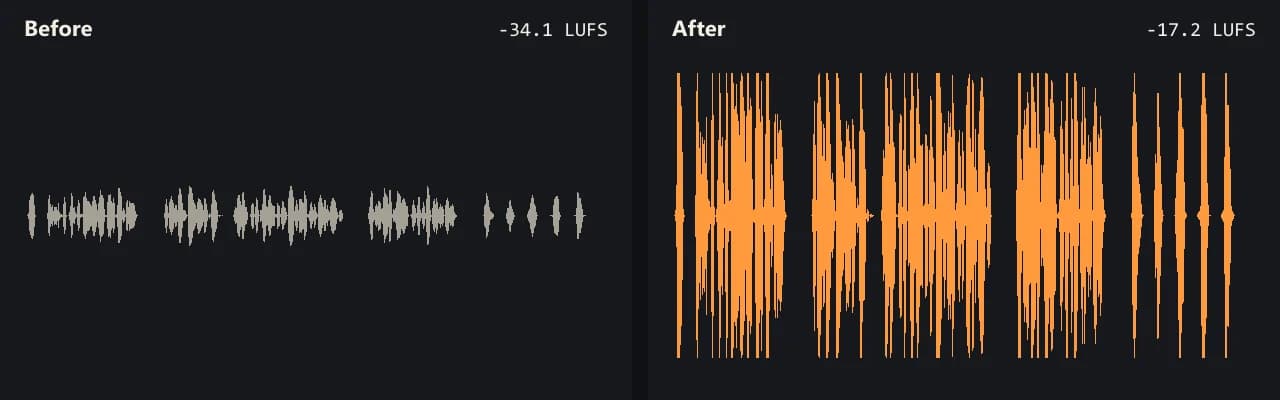
Same clip, same moment: switch while it plays. The after version is much louder, so start with your volume low.
- Test file
- quiet-voice.wav (20 s voice, mono 48 kHz)
- Export
- Voice lift, WAV, same bit depth
- Loudness before
- -34.1 LUFS
- Loudness after
- -17.2 LUFS
- Peak before
- -14.5 dB
- Peak after
- -1 dB
- Change
- +16.9 dB
- Server time
- 1.4 s
How we test: every guide runs its own quiet test file that we recorded ourselves, and we listen to each export. More on the about page.
Why your voice memo volume is so low
Voice Memos has no record level slider. Apple's own guide says to adjust the recording level by moving the microphone closer to or farther from what you record. So if the phone sat on a table across the room, the memo came out quiet, and nothing in the app can turn it up later.
Also, lectures, meetings and interviews tend to mix close and far voices. The person holding the phone sounds loud, while everyone else sounds faint. A simple volume boost keeps that gap, because it raises every voice by the same amount.
Finally, the Voice Isolation option in Control Center filters out background sound. It helps with noise, but it does not make a distant voice louder.
How Voice lift can make voice memo louder and clearer
Voice lift is the mode this page opens with. First, it cuts rumble below 80 Hz, such as table bumps and air conditioning. Next, it raises quiet words more than loud ones, so a soft question from the back of a room comes up closer to the main speaker.
Then it settles the whole memo at -16 LUFS, a common level for spoken audio. Apple Podcasts, for example, recommends about -16. Meanwhile, a peak ceiling at -1 dB keeps sudden laughs and coughs from clipping.
In our own test, a quiet voice recording at -34.1 LUFS came back at -17.2 LUFS with the peak at -1.0 dB. That is roughly 17 LU louder, with no clipped peaks.
Voice memos on Mac, Android and other apps
On a Mac, the Voice Memos app keeps recordings in sync with your iPhone when iCloud is on. Use the Share button in the app to save a copy of the recording as a file, then drop that file here.
Other voice notes work as well. The tool takes M4A, MP3, WAV, AAC, FLAC, OGG and OPUS, and each file returns in its own format. An M4A comes back as AAC at 192 kbps.
However, sound files go to our server in full, since the whole file is the sound. We delete the server copy within 30 minutes.
When this will not fix the memo
Some memos need a new recording. If the voice distorted on loud words, the crackle stays. Likewise, loud traffic or music under the voice rises with it, because this tool changes level rather than removing noise. And if the memo is only for you, try headphones first.
Quiet voice memo: causes and fixes
| Cause | What helps |
|---|---|
| Phone far from the speaker | Voice lift on the file, then record closer next time |
| Several voices at different distances | Voice lift, which raises quiet words more than loud ones |
| Low rumble from the table or room | Voice lift cuts sound below 80 Hz |
| Background noise | Voice Isolation while recording, since boosting raises noise too |
| Distorted loud words | A new recording, because clipping cannot be undone |
| Output file | Same format back, M4A as AAC 192 kbps |
Make voice memo louder FAQ
How do I make voice memo louder on iPhone?
Save the memo to Files from the share button, then drop it here in Safari. Voice lift raises the voice, and you download the louder M4A.
Can you make a voice memo louder after recording?
Not inside the Voice Memos app, since it has no volume control for a finished recording. You need to process the file, which is what this tool does.
How do I make a voice memo louder on Mac?
Save a copy of the recording from Voice Memos with the Share button, then drop the file into the box above and export.
Why is my voice memo volume so low?
Usually the phone was too far from the speaker. Apple suggests moving the mic closer, because the app has no record level setting.
Can I make a WhatsApp or Telegram voice note louder?
Yes, if you can save it as a file. OGG, OPUS, M4A and MP3 files all work and return in the same format.
Will it change my voice if I make a voice memo louder?
It evens out the level and removes low rumble. The voice keeps its tone, but very quiet words come up more than loud ones.
How long can the memo be?
Free exports cover up to 10 minutes. With credits you can process up to 3 hours, which fits most lectures.
Related guides
Try it on your own file
Three exports a day are free. Your video stays in the browser; only the sound track is processed.