Boost audio in video to the level you need
To boost audio in a video, drop the file above and choose how: Boost adds a set amount, from 100% to 1000%, while Normalize reaches a loudness target such as -14 LUFS. Listen, then export. A limiter holds peaks at -1 dB, and the picture is copied untouched, so only the sound changes.
By The Loudmend team (Product and testing). Last updated .
How to boost audio in a video, step by step
Add the video file to the box at the top of the page.
Choose Boost for a fixed amount or Normalize for a target level.
Set the number, for example 300% or -14 LUFS.
Listen to the loudest and the quietest parts.
Export and read the before and after numbers under the player.
The first 3 runs each day are free. After that, see the pricing page for packs and plans, or read how we test the tool.
Boost audio in video tested on a real quiet file
We ran this page's own test file through the same engine you use, with the settings the tool opens with. So the waveform and the numbers below are exactly what came back, measured the EBU R128 way.
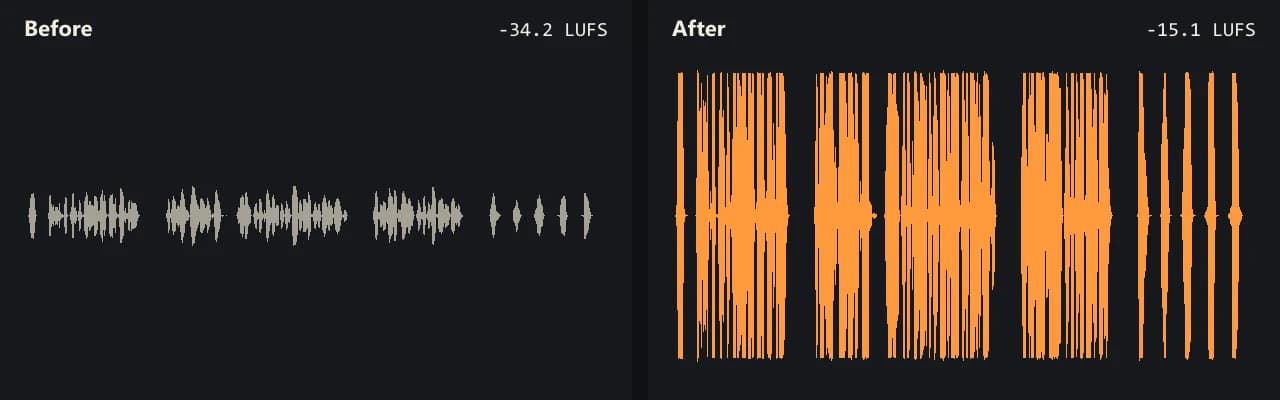
Same clip, same moment: switch while it plays. The after version is much louder, so start with your volume low.
- Test file
- quiet-interview.mp4 (20 s voice clip, 1280x720)
- Export
- Normalize to -14 LUFS, AAC 192 kbps
- Loudness before
- -34.2 LUFS
- Loudness after
- -15.1 LUFS
- Peak before
- -14.5 dB
- Peak after
- -0.8 dB
- Change
- +19.1 dB
- Server time
- 3.5 s
How we test: every guide runs its own quiet test file that we recorded ourselves, and we listen to each export. More on the about page.
Boost audio in video, or enhance it?
People often mix up two jobs. Boosting means more level, so the same sound plays louder. Enhancing means changing the sound itself, such as removing hiss, adding clarity or fixing echo.
This tool boosts. It does not clean up noise or add effects. The one exception is Voice lift, which trims rumble below 80 Hz and evens out speech. So if the clip sounds clear but quiet, you are in the right place. If it sounds muddy or noisy, a boost alone will not fix that.
How to boost audio in video by the right amount
The Boost slider counts in percent of the original wave height. Decibels follow from that with a simple rule: 20 times the log of the ratio. So 200% is about +6 dB, 300% about +9.5 dB, 500% about +14 dB and 1000% exactly +20 dB.
Each step up makes peaks hit the top sooner. For that reason, the clipping guard holds every peak at -1 dB. Quiet parts keep rising while loud parts stay clean. For example, our quiet test interview at 1000% with the guard reached -15.9 LUFS with the peak at -0.9 dB.
Without the guard, the same boost would flatten the tops of the wave. That is the crackle you hear in phone clips turned up too far.
Pick a target for where the video goes
Normalize is easier when you know the destination. It measures the clip the way the ITU-R BS.1770 standard describes, then applies one gain to hit a target. Streaming services such as YouTube and Spotify play music at about -14 LUFS. Podcasts and voice sit at -16, loud social clips at -11, and broadcast at -23.
Peaky recordings may land a little under the target, because the peak ceiling wins. In our test, Normalize at -11 stopped at -13.7 LUFS for that reason. Meanwhile, Normalize at -14 reached -15.1 LUFS, a rise of 19.1 dB.
What happens to the audio track
Your browser copies the audio track out of the video without decoding the picture. Then only the audio goes to our server. After the boost, the browser puts it back next to the original picture.
The new audio is AAC at 192 kbps for MP4, MOV, M4V and MKV, or Opus at 160 kbps for WebM. Subtitles and chapters stay when the format allows. We delete the server copy within 30 minutes.
When this is not the right choice
A boost cannot undo clipping that is already in the file. Background noise rises with everything else, too. A video with several audio tracks, such as dubbed languages, comes back with only the first one. Also, if you only want louder playback while you watch, a player setting does the job.
Loudness targets to boost audio in video
| Where the video goes | Normalize target |
|---|---|
| YouTube, Spotify and most streaming | -14 LUFS |
| Podcasts, Apple Music, talks | -16 LUFS |
| Loud social clips | -11 LUFS |
| Broadcast (EBU R128) | -23 LUFS |
| Peak ceiling for every target | -1 dB |
Boost audio in video FAQ
How do I boost audio in a video file?
Drop the file here, choose Boost or Normalize and export. You get the same video back with a louder audio track.
Can I boost audio in video online for free?
Yes. There are 3 free exports a day with no account, for sound up to 10 minutes long and boosts up to 300%.
What is the difference between boost and enhance?
Boost raises the level. Enhance changes the sound, such as noise removal. This tool boosts, with a small rumble cut in Voice lift.
How much can I boost audio in video without distortion?
With the clipping guard on, peaks stay at -1 dB at any setting. Still, very large boosts also raise hiss, so listen first.
Does it work for iPhone and Android videos?
Yes. Open the page in your phone browser and pick the clip. Keep phone files under about 500 MB.
Which LUFS target should I pick for YouTube?
Try -14 LUFS. Streaming services such as YouTube and Spotify play music at about that level, so your clip will not sound quiet next to others.
Related guides
Try it on your own file
Three exports a day are free. Your video stays in the browser; only the sound track is processed.