Increase video volume in your browser
To increase video volume, drop the clip into the tool above, set the slider to 200% or 300% and press play to hear it. Then export. Only the sound track changes, while the picture is copied bit for bit, so the video keeps its quality. Three exports a day are free.
By The Loudmend team (Product and testing). Last updated .
How to increase video volume, step by step
Drop your video on the box above, or pick it with Choose file.
Leave Boost selected and move the slider to 200% for a clear lift.
Press play and listen, because the preview runs in your browser before anything leaves it.
If the loud parts still sound clean, press Make it louder.
Finally, download the file and compare the loudness numbers shown under it.
The first 3 runs each day are free. After that, see the pricing page for packs and plans, or read how we test the tool.
Increase video volume tested on a real quiet file
We ran this page's own test file through the same engine you use, with the settings the tool opens with. So the waveform and the numbers below are exactly what came back, measured the EBU R128 way.
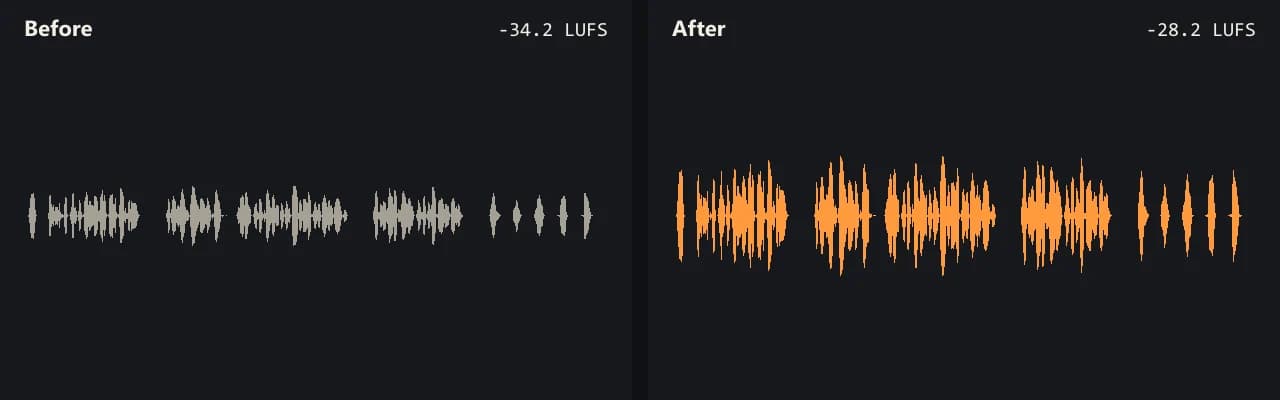
Same clip, same moment: switch while it plays. The after version is much louder, so start with your volume low.
- Test file
- quiet-interview.mp4 (20 s voice clip, 1280x720)
- Export
- Boost 200%, AAC 192 kbps
- Loudness before
- -34.2 LUFS
- Loudness after
- -28.2 LUFS
- Peak before
- -14.5 dB
- Peak after
- -8.5 dB
- Change
- +6 dB
- Server time
- 1.4 s
How we test: every guide runs its own quiet test file that we recorded ourselves, and we listen to each export. More on the about page.
What happens to the file when you increase video volume
A video file holds a picture track and a sound track side by side. Most editors decode both and then encode both again, so a short clip can take minutes and the picture gets a little softer each time. This tool works another way.
First, your browser copies the sound track out of the video. It does not decode the picture at all. Then only that sound goes to our server, where it gets louder. After that, your browser puts the new sound back next to the original picture. As a result, there is no picture loss and no render wait.
The first video loads a 31 MB engine once. After that, a 20 second clip takes about a second and a half on the server. Also, we delete the server copy within 30 minutes, and we never see the picture.
How much louder each setting gets
The slider works in percent of the original level. So 200% doubles the wave height, which is about 6 dB. That is the step most people hear as clearly louder, but not harsh. Then 300% adds about 9.5 dB, and 1000% adds 20 dB.
Big boosts push the loud moments past the top. For that reason, the clipping guard is on by default. It holds every peak at -1 dB while the quiet parts keep rising. You can switch it off, but then a shout or a door slam can crackle.
If you do not know what number to pick, try Normalize instead. It measures the whole clip in LUFS, the loudness unit that streaming services use, and then sets one gain to reach a target such as -14 LUFS.
Increase video volume on a phone or a laptop
The tool runs in a normal browser tab, so there is nothing to install. On a desktop browser, videos up to 2 GB work. Phones have less memory, though, so keep phone videos under about 500 MB.
It reads MP4, MOV, M4V, MKV and WebM. Your file comes back in the same container it came in. The new sound is AAC at 192 kbps in MP4, MOV, M4V and MKV, or Opus at 160 kbps in WebM.
For example, our own quiet test interview measured -34.2 LUFS. At 300% it came back at -24.7 LUFS, so it gained 9.5 dB with the peak still at -5.0 dB.
When this is not the right choice
Some problems need a different fix. If the recording already clipped, the tops of the wave are flat and the sound crackles. Making it louder only makes that crackle louder.
Background noise is the second limit. A fan, wind or traffic rises along with the voice, because a gain change lifts everything. Noise reduction is a separate job.
Also, if you only want louder playback on your own screen, a player setting or a browser extension is enough. This tool is for a file you plan to send, post or upload. Finally, a video with two sound tracks, such as two languages, comes back with only the first one.
Volume percent and the gain it adds
| Slider setting | Gain in decibels |
|---|---|
| 100% (unchanged) | 0 dB |
| 200% | +6 dB |
| 300% (free limit) | +9.5 dB |
| 500% | +14 dB |
| 1000% (with credits) | +20 dB |
| Clipping guard | Peaks held at -1 dB |
Increase video volume FAQ
Can you increase volume on a video file?
Yes. You raise the level of the sound track inside the file. Our tool does that and leaves the picture as it was, so the file plays louder in every player.
How do I increase video volume online for free?
Drop the video above and export with Boost at up to 300%. You get 3 free exports a day, with no account and no watermark, for sound up to 10 minutes long.
How can I increase video volume without losing quality?
Keep the picture out of the process. Here the picture is copied bit for bit, and only the sound is encoded again as AAC 192 kbps or Opus 160 kbps.
Is a volume extension the same thing?
No. An extension makes a tab play louder on your computer only. The file itself stays quiet when you send it to someone else.
Why does my video still sound quiet at 300%?
Very quiet recordings can need more than 9.5 dB. In that case, try Normalize at -14 LUFS, or use credits for a boost up to 1000%.
How to increase video volume in the gallery app?
Phone gallery apps play the file at the level it was recorded. So to make the file itself louder, open this page in your phone browser and export a louder copy.
Does it work for long videos?
Free runs take sound up to 10 minutes long. With credits, the limit is 3 hours, and each export uses 1 credit.
Related guides
Try it on your own file
Three exports a day are free. Your video stays in the browser; only the sound track is processed.