MP3 volume booster for quiet songs, podcasts and recordings
This MP3 volume booster raises a quiet MP3 and gives you an MP3 back. Drop the file, drag the Boost slider, and listen before you export. A peak limiter at -1 dB stops distortion on loud parts. The new file is encoded once at 256 kbps, a higher bitrate than many MP3s start with.
By The Loudmend team (Product and testing). Last updated .
How to boost the volume of an MP3, step by step
Drop your MP3 into the box above.
Drag the Boost slider. 200% adds about 6 dB, and 300% adds about 9.5 dB.
Press play and listen to the quietest part of the track.
Keep the clipping guard on so the loud parts stay clean.
Export, then download the louder MP3.
The first 3 runs each day are free. After that, see the pricing page for packs and plans, or read how we test the tool.
MP3 volume booster tested on a real quiet file
We ran this page's own test file through the same engine you use, with the settings the tool opens with. So the waveform and the numbers below are exactly what came back, measured the EBU R128 way.
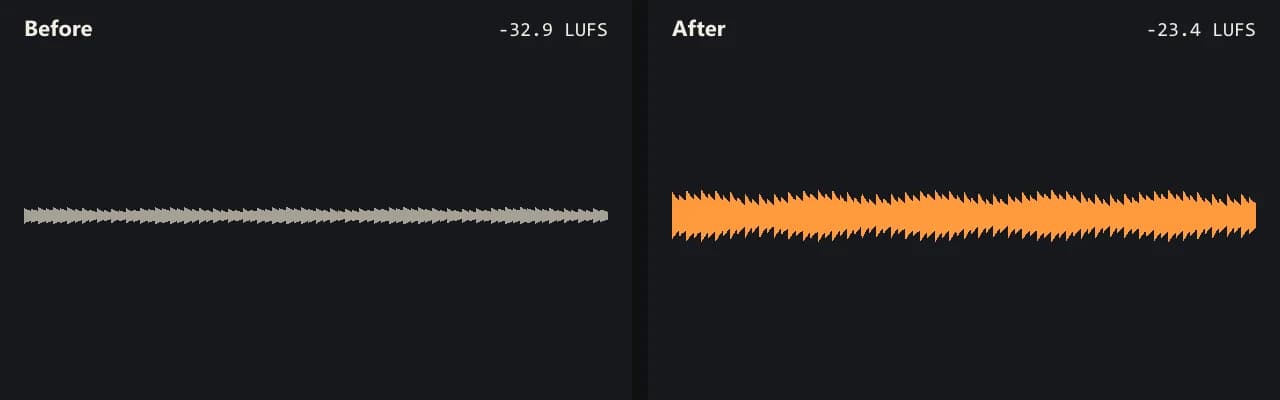
Same clip, same moment: switch while it plays. The after version is much louder, so start with your volume low.
- Test file
- quiet-music.mp3 (20 s music, 192 kbps)
- Export
- Boost 300%, MP3 256 kbps
- Loudness before
- -32.9 LUFS
- Loudness after
- -23.4 LUFS
- Peak before
- -25.3 dB
- Peak after
- -15.8 dB
- Change
- +9.5 dB
- Server time
- 1.4 s
How we test: every guide runs its own quiet test file that we recorded ourselves, and we listen to each export. More on the about page.
What an MP3 volume booster really changes
An MP3 is compressed sound. To change its volume in the usual way, a tool has to decode the file, raise the level, and then encode a new MP3. That last step is a new round of lossy compression.
So this tool keeps that round as gentle as it can. It encodes the louder file once, at 256 kbps. That is higher than many MP3s start with, so the new encode has room to spare. For example, our quiet test track was a 192 kbps MP3.
Also, the boost itself can add damage when it pushes peaks past the digital ceiling. The clipping guard prevents that. It is a peak limiter at -1 dB, on by default, and it lets the quiet parts rise while the loud parts stay under the limit.
Our MP3 volume booster test, in numbers
We made a quiet 20 second MP3 to test the tool. It started at -32.9 LUFS with its loudest peak at -25.3 dB, which is quiet enough to sound faint on a phone speaker.
Then we set Boost to 500%. The file came back at -18.9 LUFS, which is 14 dB louder, and the peak landed at -11.4 dB. Since the peaks stayed far below the ceiling, the limiter did not need to touch them.
You see the same kind of numbers after every export: loudness before and after, peak before and after, and the change in dB. Thus you can check the result without guessing.
A lossless option: MP3Gain
There is a different approach worth knowing about. MP3Gain is a free program that changes MP3 volume without decoding and re-encoding the file. According to its own site, no quality is lost, because it adjusts the MP3 directly. It also writes undo information, so you can reverse the change later.
However, it is a desktop program you have to install. It also applies one gain to the whole track, so it cannot lift quiet words more than loud ones. Choose it when you have a large music library and want zero loss. Choose this tool when you need one file louder quickly, in a browser, with a preview first.
When an MP3 volume booster will not help
If the MP3 already sounds crackly on loud notes, it clipped before it reached you, and a louder copy keeps that crackle. Likewise, hiss and room noise rise along with the music or voice.
Also, if the song is only quiet in your own player, turn on the player's volume setting instead. This tool is for a file you will share, upload or play on another device.
MP3 boost settings and what they mean
| Setting | Effect |
|---|---|
| Boost 200% | About +6 dB |
| Boost 300% (free limit) | About +9.5 dB |
| Boost 500% | About +14 dB |
| Boost 1000% (with credits) | About +20 dB |
| Clipping guard | Peak limiter at -1 dB, on by default |
| Output | MP3 at 256 kbps, encoded once |
MP3 volume booster FAQ
Is there an MP3 volume booster online for free?
Yes, this one. You get 3 free exports a day with no account and no watermark, for files up to 10 minutes long.
How do I use an MP3 volume booster without distortion?
Keep the clipping guard on. It holds the peaks at -1 dB, so you can raise the overall level without the loud parts breaking up.
Can I increase MP3 volume without losing quality?
Not with a re-encode, but one encode at 256 kbps keeps the loss small. For truly lossless changes, a program such as MP3Gain edits the file without re-encoding.
Why is my MP3 so quiet?
It was likely recorded far from the mic or mastered at a low level. Voice recordings in particular tend to sit well below the level of commercial music.
Is there an MP3 volume booster app for my phone?
You do not need an app. Open this page in your phone's browser, pick the MP3 from your files, and download the louder copy when it is ready.
Does the file stay an MP3?
Yes. An MP3 goes in and an MP3 comes out, so it plays anywhere the old one did.
How big can the MP3 be?
Uploads can be up to 100 MB. Free runs cover sound up to 10 minutes, and credits cover up to 3 hours.
Related guides
Try it on your own file
Three exports a day are free. Your video stays in the browser; only the sound track is processed.