Make voice louder in video, word by word
To make a voice louder in a video, drop the clip above and keep Voice lift selected. It cuts low rumble, raises soft words more than loud ones and lands near -16 LUFS, a common level for speech. Then listen and export. Only the sound changes, and the picture is copied as is.
By The Loudmend team (Product and testing). Last updated .
How to make a voice louder in a video, step by step
Drop the video with the quiet talking onto the box above.
Keep Voice lift on, since this page opens in that mode.
Play the part where the speaker is softest and listen.
If the whole clip only needs more level, switch to Boost instead.
Export and compare the loudness before and after.
The first 3 runs each day are free. After that, see the pricing page for packs and plans, or read how we test the tool.
Make voice louder in video tested on a real quiet file
We ran this page's own test file through the same engine you use, with the settings the tool opens with. So the waveform and the numbers below are exactly what came back, measured the EBU R128 way.
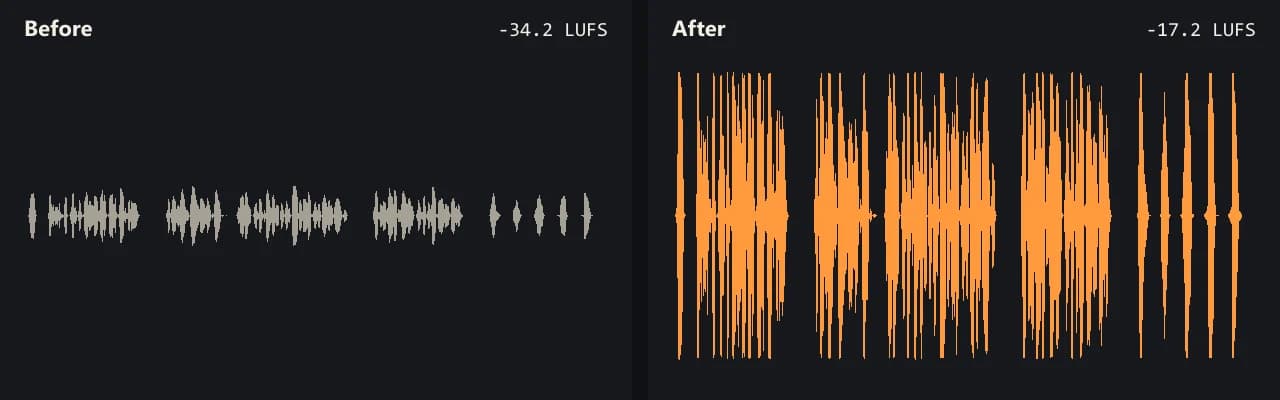
Same clip, same moment: switch while it plays. The after version is much louder, so start with your volume low.
- Test file
- quiet-interview.mp4 (20 s voice clip, 1280x720)
- Export
- Voice lift, AAC 192 kbps
- Loudness before
- -34.2 LUFS
- Loudness after
- -17.2 LUFS
- Peak before
- -14.5 dB
- Peak after
- -0.9 dB
- Change
- +17 dB
- Server time
- 2.2 s
How we test: every guide runs its own quiet test file that we recorded ourselves, and we listen to each export. More on the about page.
Why a plain boost often fails on speech
Speech jumps up and down all the time. A person leans back, turns their head or drops their voice at the end of a sentence. So the loud words may already sit near the top while the soft ones are hard to hear.
A plain volume boost raises every word by the same amount. As a result, the loud words hit the ceiling first, and the soft words are still too quiet next to them. That is the gap Voice lift is built to close.
How Voice lift makes a voice louder in video
Voice lift runs three steps on the sound track. First, it cuts rumble below 80 Hz, such as desk bumps, traffic hum and handling noise. Those low sounds take up level that the voice could use.
Then it runs a speech leveler from FFmpeg called speechnorm. It raises quiet words more than loud ones, so the speech comes out more even. Finally, it sets the whole track to -16 LUFS with a peak ceiling at -1 dB. Apple Podcasts recommends about that level for spoken content.
For example, our own quiet voice test started at -34.1 LUFS. After Voice lift, it measured -17.2 LUFS with the peak at -1.0 dB.
Make one voice louder in video with two people
Interviews often have one close voice and one far voice. Because Voice lift raises soft speech more than loud speech, the far speaker comes up more than the near one. So the two get closer in level, even though both share one track.
Still, it cannot pick one person and leave the other alone. It works on loudness, not on who is talking. If you need one voice much louder than the other, an editor with separate mic tracks is the better route.
When this is not the right choice
Music under a voice is the big limit. When the song and the speech share one sound track, the music rises too. Our tool cannot pull them apart, so it will not make a voice louder than the music behind it. For that, you need the original voice and music as separate tracks.
Also, noise like a fan or wind rises together with the voice, and a recording that already clipped stays crackly. A clip with two sound tracks returns with only the first one.
What Voice lift does to make a voice louder in video
| Step | What it does |
|---|---|
| Low cut | Removes rumble below 80 Hz |
| Speech leveling | FFmpeg speechnorm raises soft words more than loud ones |
| Final loudness | -16 LUFS, the common level for speech |
| Peak ceiling | -1 dB, so loud words do not clip |
| Our test file | -34.1 LUFS in, -17.2 LUFS out, peak -1.0 dB |
| Picture | Copied bit for bit, never encoded again |
Make voice louder in video FAQ
How do I make my voice louder in a video?
Drop the video on this page and export with Voice lift. Your speech comes up to about -16 LUFS, and soft words get the most help.
How to make voice louder than music in video?
Only if the voice and the music are on separate tracks. On one mixed track, any gain raises both, so this tool cannot do it.
Can I make one person's voice louder in a video?
Partly. Voice lift brings a soft speaker closer to a loud one. However, it cannot single out one person on a shared track.
Is Voice lift better than Boost for talking?
Usually, yes. Boost raises everything by the same amount, while Voice lift evens out the words first. For a clip that is just quiet overall, Boost is fine.
Does it remove background noise?
It removes low rumble below 80 Hz. Other noise, such as a fan or voices nearby, stays and gets louder with the speech.
Will the video quality drop?
No. The tool copies the picture exactly and only writes a new sound track, as AAC 192 kbps or Opus for WebM.
Related guides
Try it on your own file
Three exports a day are free. Your video stays in the browser; only the sound track is processed.