Make audio louder and keep the same file format
To make audio louder, drop the file into the box above, choose how much louder, and press play to hear it first. Then export. You get the same format back: an MP3 stays an MP3, a WAV stays a WAV. A peak limiter at -1 dB keeps the loud parts from cracking while the quiet parts come up.
By The Loudmend team (Product and testing). Last updated .
How to make an audio file louder, step by step
Drop an MP3, WAV, M4A, AAC, FLAC, OGG or OPUS file into the box above.
Pick a mode: Boost for a set amount, Normalize for a target level, or Voice lift for speech.
Press play and listen, then adjust the slider or target if needed.
Export and wait a few seconds while the server processes the file.
Download the louder file, which keeps its original format.
The first 3 runs each day are free. After that, see the pricing page for packs and plans, or read how we test the tool.
Make audio louder tested on a real quiet file
We ran this page's own test file through the same engine you use, with the settings the tool opens with. So the waveform and the numbers below are exactly what came back, measured the EBU R128 way.
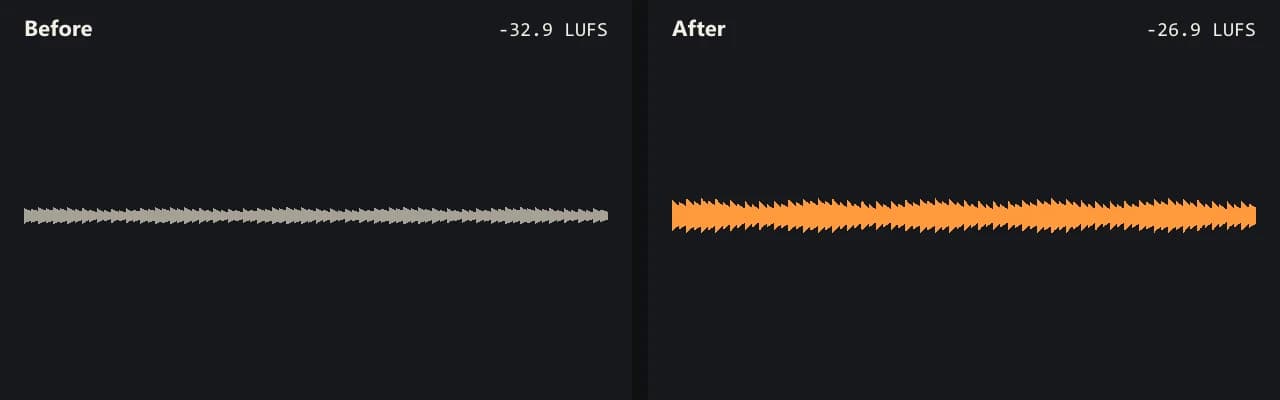
Same clip, same moment: switch while it plays. The after version is much louder, so start with your volume low.
- Test file
- quiet-music.mp3 (20 s music, 192 kbps)
- Export
- Boost 200%, MP3 256 kbps
- Loudness before
- -32.9 LUFS
- Loudness after
- -26.9 LUFS
- Peak before
- -25.3 dB
- Peak after
- -19.3 dB
- Change
- +6 dB
- Server time
- 1.5 s
How we test: every guide runs its own quiet test file that we recorded ourselves, and we listen to each export. More on the about page.
Three ways to make audio louder
Boost is the simplest. You set a percent of the original volume, from 100% to 1000%. For example, 200% adds about 6 dB, 300% adds about 9.5 dB, and 500% adds about 14 dB. Use it when you already know the file needs a fixed lift.
Normalize works from a goal instead of an amount. You pick a loudness target in LUFS, such as -14 for streaming or -16 for podcasts. Then the tool measures the file and adds whatever gain it takes to get there. This is the easy choice when several files must sound equally loud.
Voice lift is built for speech. It cuts rumble below 80 Hz and raises quiet words more than loud ones, then settles at -16 LUFS. So a lecture or an interview with uneven levels ends up easier to follow.
Which formats work and what comes back
The tool takes MP3, WAV, M4A, AAC, FLAC, OGG and OPUS. Each file returns in its own format, so you never have to convert it again before you use it.
Still, the details differ by format. MP3 comes back at 256 kbps. WAV keeps its bit depth, whether 16 or 24 bit, and FLAC stays lossless. M4A and AAC return as AAC 192 kbps, OGG as Vorbis quality 6, and OPUS as Opus 160 kbps.
Unlike videos, sound files go to our server in full, because the whole file is the sound. Uploads can be up to 100 MB. We delete the server copy within 30 minutes, when the download link expires.
How much louder can you make audio?
It depends on how quiet the file starts and how high its peaks already sit. In our own test, a quiet 20 second MP3 began at -32.9 LUFS. A 500% boost took it to -18.9 LUFS, a gain of 14 dB, and the peak only reached -11.4 dB.
However, a file with sharp peaks runs out of room sooner. In that case the limiter holds the peaks at -1 dB, so the overall level rises less than the slider suggests. After each export you see the loudness and the peak before and after, so you know exactly what changed.
When you should not use this to make audio louder
Some problems need a different fix. A file that clipped during recording sounds flat and crackly, and more volume cannot repair it. Similarly, background hiss or traffic grows with the voice, since gain lifts everything at once.
Also, if the sound is only too quiet on your own laptop or phone, a player setting or a browser extension will do. This tool is for a file you plan to send, upload or publish. And if your sound sits inside a video, use the video pages instead, because they leave the picture untouched.
Output format for each input
| Input format | What you get back |
|---|---|
| MP3 | MP3 at 256 kbps |
| WAV | WAV with the same bit depth (16 or 24 bit) |
| FLAC | FLAC, still lossless |
| M4A or AAC | AAC at 192 kbps |
| OGG | Vorbis at quality 6 |
| OPUS | Opus at 160 kbps |
Make audio louder FAQ
How do I make audio louder online for free?
Drop the file here and export. You get 3 free exports a day with no account, for sound up to 10 minutes and boosts up to 300%.
Can I make audio louder without distortion?
Yes, as long as the recording is clean to begin with. The clipping guard keeps peaks under -1 dB, so loud parts stay smooth.
How do I make audio louder in a video?
Drop the video itself instead of the sound. The tool lifts the sound track and copies the picture untouched, so you skip any export in an editor.
What is the difference between boost and normalize?
Boost adds a fixed amount, like +6 dB. Normalize aims for a loudness level, like -14 LUFS, and works out the gain for you.
Can I make audio louder on my iPhone?
Yes. Open this page in Safari and pick the file from the Files app. Then download the louder copy when the export is done.
Will my MP3 lose quality?
It goes through one new encode at 256 kbps. If you need zero change in quality, start from a WAV or FLAC file instead.
Do I need DaVinci Resolve or Audacity to make audio louder?
No. Those apps can do it, but you need to install them and learn their tools. Here you drop the file, listen and export.
Related guides
Try it on your own file
Three exports a day are free. Your video stays in the browser; only the sound track is processed.