Make screen recording louder when the mic came out quiet
To make screen recording louder, drop the file into the box above and pick Voice lift. Then press play to hear the result before you export. Your picture never leaves the device, because only the sound goes to our server. You get the same MOV or MP4 back, with the narration raised and the peaks kept clean.
By The Loudmend team (Product and testing). Last updated .
How to make a screen recording louder, step by step
Find the recording. On an iPhone it is in Photos, and on a Mac it is a .mov file on the desktop unless you picked another folder.
Drop the file into the box above. The picture stays in your browser.
Keep Voice lift for narration, or switch to Boost for game sound or a recorded call.
Press play and listen to a few quiet sentences.
Export, then download the louder file in the same format.
The first 3 runs each day are free. After that, see the pricing page for packs and plans, or read how we test the tool.
Make screen recording louder tested on a real quiet file
We ran this page's own test file through the same engine you use, with the settings the tool opens with. So the waveform and the numbers below are exactly what came back, measured the EBU R128 way.
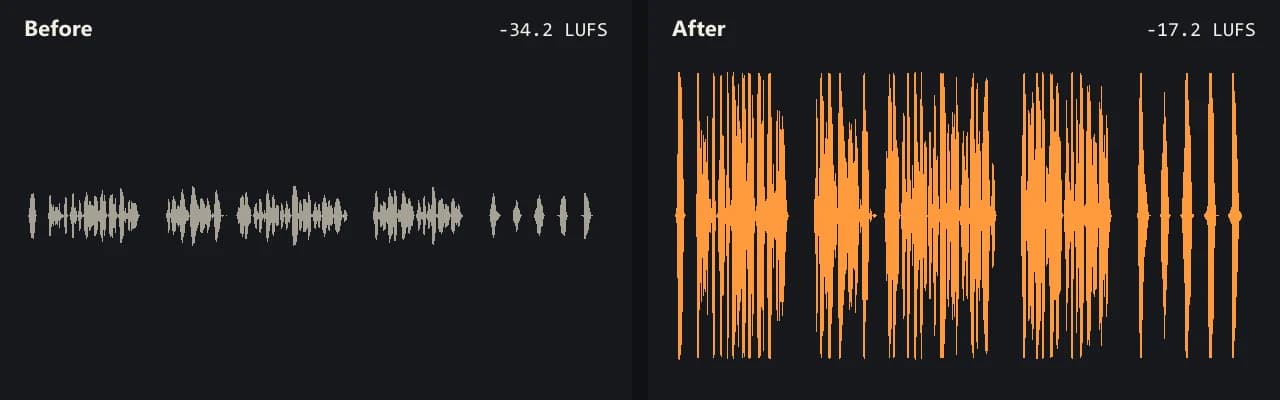
Same clip, same moment: switch while it plays. The after version is much louder, so start with your volume low.
- Test file
- quiet-interview.mp4 (20 s voice clip, 1280x720)
- Export
- Voice lift, AAC 192 kbps
- Loudness before
- -34.2 LUFS
- Loudness after
- -17.2 LUFS
- Peak before
- -14.5 dB
- Peak after
- -0.9 dB
- Change
- +17 dB
- Server time
- 2.1 s
How we test: every guide runs its own quiet test file that we recorded ourselves, and we listen to each export. More on the about page.
Why your screen recording is so quiet
Most quiet screen recordings come from the microphone, not the screen. A laptop mic sits a foot or two from your mouth, so it picks up your voice at a low level. In addition, many recorders capture the mic exactly as the system hands it over, with no automatic gain.
On an iPhone, the mic is off unless you turn it on. Apple says to touch and hold the Record button in Control Center, then tap Microphone. If you skip that step, the file has no voice at all, and no tool can make silence louder.
Meanwhile, the Mac Screenshot app (Shift-Command-5) lets you pick a microphone under Options. It saves screen recordings as .mov files. So if the voice sounds thin, check which mic had the checkmark, since an idle webcam mic is a common surprise.
Windows, OBS, Zoom and Loom recordings
On Windows, Snipping Tool records a video snip with Windows logo key + Shift + R. Game Bar also records clips. Both take the mic at the input level set in Windows, so a low level there means a low level in the file.
OBS gives every source a fader in its audio mixer. The OBS guide suggests setting the device near 0 dB in Windows first, and only then using the fader. Still, a fader set too low during a long session is easy to miss until playback.
Zoom and Loom files carry whatever level the call or capture had. For example, a guest on a weak headset can sound far quieter than the host. Our tool raises the whole sound track, so Voice lift is the better pick there, because it lifts quiet words more than loud ones.
Make screen recording louder without a new export
A video editor would decode and re-encode the whole picture just to change the sound. That takes time, and text on screen can lose sharpness. This tool works the other way.
First, FFmpeg running in your browser copies the sound track out of the file. Next, only that sound goes to our server, where it gets louder. Finally, your browser puts the louder sound back next to the original picture, copied bit for bit. The first video loads a 31 MB engine once.
As a result, code, slides and small menu text look exactly as they did. We delete the server copy of the sound within 30 minutes, and we never see the picture.
When this is not the right fix
Some recordings need a different tool. If the voice already distorted while you talked, the crackle stays, because a louder copy of clipped sound is still clipped. Likewise, a loud fan or keyboard rises along with your voice, and noise removal is a separate job.
Also, if you only need to hear the file better on your own computer, raise the player volume instead. Use this tool when you plan to send, post or upload the recording. Keep in mind that only the first sound track comes back, so a recording with separate mic and system tracks keeps just the first one.
Where screen recordings come from and what to check
| Recorder | What to check before you record again |
|---|---|
| iPhone or iPad | Touch and hold Record in Control Center, then turn on Microphone |
| Mac Screenshot app | Options menu, under Microphone, pick the mic you speak into |
| Windows Snipping Tool | The mic input level in Windows sound settings |
| OBS Studio | The mic fader in the audio mixer, after the device level is near 0 dB |
| Zoom or Loom | Headset or mic distance, since the file keeps the call level |
| Output from this tool | Same container, sound as AAC 192 kbps (Opus 160 kbps for WebM) |
Make screen recording louder FAQ
Why is my screen recording volume so low?
Usually the mic was far away or set low. Laptop mics and webcam mics catch a faint voice, and most recorders do not raise it for you.
How do I make screen recording mic louder on iPhone?
For the next recording, speak closer to the phone. For a file you already have, drop it here and use Voice lift, which raises quiet words more than loud ones.
My screen recording has no sound at all. Can this help?
No. If the mic was off, the file has no voice to raise. On an iPhone, turn on Microphone from the Record button in Control Center before you start.
How do I make screen recording audio louder on a Mac?
Drop the .mov file from your desktop into the box above. You get a .mov back with the same picture and a louder sound track.
Will the text in my recording get blurry?
No. The picture is never decoded. The tool copies it bit for bit, so small text and code look the same as before.
Can I boost a Zoom or Loom recording?
Yes, as long as you can download it as MP4, MOV, M4V, MKV or WebM. Then drop it here like any other video.
Is it free to make screen recording louder?
You get 3 free exports a day with no account and no watermark. Free runs cover sound up to 10 minutes and boosts up to 300%.
Related guides
Try it on your own file
Three exports a day are free. Your video stays in the browser; only the sound track is processed.