Best video volume booster: 8 tools compared honestly
The best video volume booster depends on your file. EchoWave and Video2Edit suit a quick free boost, while Rotato and Videoradius keep the video in your browser. Kapwing and Flixier fit full editing. Our tool fits when you want a louder file with no watermark, a LUFS target and an untouched picture.
By The Loudmend team (Product and testing). Last updated .
Best video volume booster: side by side
We read each public page on October 28, 2026. So where a page does not state a fact, the table says so.
| Our tool | Video2Edit | EchoWave | Rotato | Videoradius | Kapwing | Flixier | Volume Booster app (iPhone) | |
|---|---|---|---|---|---|---|---|---|
| Free use | 3 exports a day, sound up to 10 minutes | Free; file processing limited | Free tool | Free | Free | Free plan: 4 minute exports, 10 credits | Free plan: 10 export minutes a month at 720p | Free download, boost up to 299% |
| Account | None needed | None needed | Not needed to start, per pricing page | None needed | None needed | Not stated | Not stated; no card needed | None stated |
| Max file size | Videos up to 2 GB in a desktop browser; sound files 100 MB | Free: not stated; Starter: 64 GB | Paid: no upload limit; free: not stated | Not stated | 300 MB per file | Free 2 GB, Pro 6 GB | Not stated | Not stated |
| Watermark | None | None, per the tool page | None on most free tools; small badge on free editor exports | Not stated | Not stated | Yes, on all free video exports | Yes, on the free plan | Not stated |
| Where it runs | Video stays on the device; only the sound track goes to our server, deleted within 30 minutes | On its servers | Browser editor; render location not stated | In the browser, no upload | In the browser, no upload | Cloud editor | Cloud editor | On the iPhone or iPad |
Best video volume booster boost, output and price
| Our tool | Video2Edit | EchoWave | Rotato | Videoradius | Kapwing | Flixier | Volume Booster app (iPhone) | |
|---|---|---|---|---|---|---|---|---|
| Max boost | 300% free, 1000% with credits, -1 dB peak limiter | 400% | 500% | 3x | 300% | Not stated (slider) | Not stated (volume or gain control) | 1000% with Premium, soft limiter |
| Loudness target | -14, -16, -11 or -23 LUFS, plus Voice lift | Separate Normalize Audio app | Yes, -30 to -6 LUFS, default -16 | No | No | One click normalize tool in the editor | Enhance Audio evens out the volume | Not stated |
| Output | Same format as the input; picture copied untouched | Not stated; MP4, MOV, AVI, WebM, MKV, WMV in | MP4 | Not stated; MOV, MP4, AVI in | MP4 or WebM; video stream copied when possible | MP4 video, MP3 audio | Not stated | Video keeps its track; audio becomes M4A |
| Price | $4.99 for 25 exports once; $5.99 a month for 60; $11.99 a month for 400 | Paid plan prices not readable | From $9 a month billed yearly, $19 monthly | Free | Free online; desktop apps from $19.99 lifetime | Pro $16 a month | From $19 a seat a month | $5.99 a week or $29.99 a year |
How we picked the best video volume booster
First, the method. On October 28, 2026, we read the public tool page and the pricing page of each tool in the table. Then we wrote down only what those pages state about each best video volume booster pick. So every cell points to a page you can open, and the links sit at the bottom.
However, we did not sign up or pay for the other tools. As a result, this guide compares stated facts such as free limits, file size and price. It does not judge sound quality by ear. Also, we make one of the tools here, so read our column with that in mind. Where a page did not say something, the cell says "Not stated".
Free tools that boost video volume online
Rotato and Videoradius both work on the video inside your browser. Rotato says it will not upload or store your files, and it offers boost levels from 1.5x to 3x. Videoradius goes from mute to 300% and takes files up to 300 MB. In addition, it copies the video stream when it can, so the picture keeps its quality.
Video2Edit works on its own servers instead. Its menu runs from 5% to 400%, and it needs no account. It also takes batches, links and cloud files. EchoWave goes further, with a 500% slider and a LUFS mode from -30 to -6. Its free tools export clean files, and it adds fades of up to 10 seconds.
Meanwhile, videolouder.com is the classic upload tool. You pick a change in decibels, upload a file up to 500 MB and then download the result. Its page says it removes uploads after a few hours.
Kapwing, Flixier, VEED and other editors
Kapwing, Flixier and VEED are full video editors. So you open a project, put the clip on a timeline and move a volume slider. That helps when only one part of a clip is quiet. For example, Flixier lets you split out a quiet section and raise it alone.
However, all three put a watermark on free video exports. Kapwing also caps free exports at 4 minutes and free uploads at 2 GB. Similarly, the Flixier free plan gives 10 minutes of export time a month at 720p. Therefore these editors make sense when you already edit there or plan to pay. None of their volume pages states a maximum boost.
VideoCandy sits in between. It sells plans from $3 a month billed yearly, and its paid plans list no watermark and uploads up to 8 GB. Still, its page does not state the free limits.
Where the others beat our tool
We should be clear about our limits. Video2Edit and Kapwing take far bigger files on paid plans, up to 64 GB and 6 GB. Our tool works with videos up to 2 GB in a desktop browser, and less on a phone. Also, EchoWave adds fades, and the editors let you raise only one part of a clip. We do neither, because our tool changes the whole sound track.
In addition, our free use stops at 3 exports a day and 300%. Rotato and Videoradius state no daily cap on their pages. The iPhone app Volume Booster: Louder Sound works right on the phone and adds Bass Boost. Finally, no tool here can repair sound that already clipped, and loud background noise rises with the voice.
Which is the best video volume booster for you
The best video volume booster for you starts with where the file will go. For a quick free boost, try EchoWave or Video2Edit. To keep a private clip off any server, Rotato and Videoradius run in the browser. If you already edit on a timeline, use the volume control in Kapwing or Flixier. On an iPhone, the Volume Booster app does the job on the device.
Then choose our tool when the louder file must look exactly like the original. It copies the picture bit for bit and sends only the sound track to our server, which deletes it within 30 minutes. You also get a LUFS target such as -14 or -16, a Voice lift mode for speech and a -1 dB peak limiter.
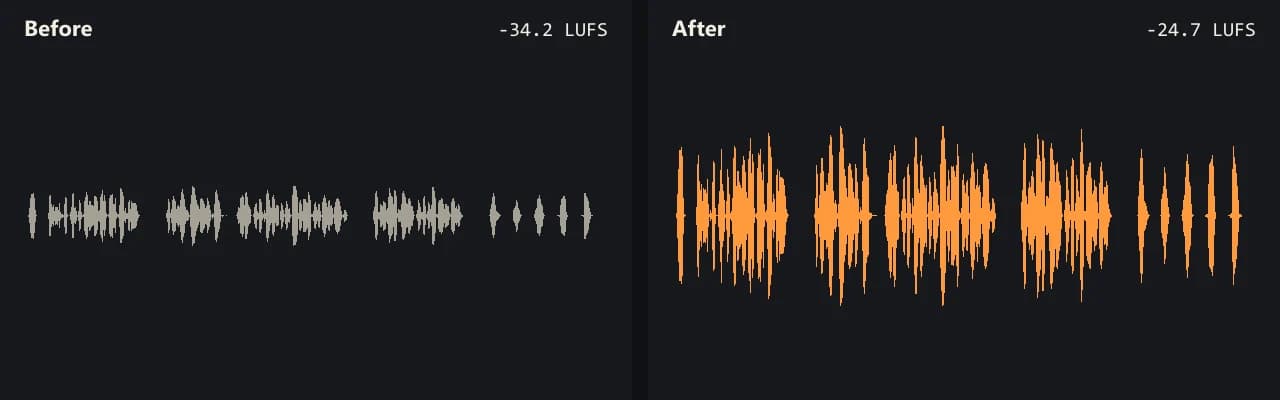
For example, our quiet test interview went from -34.2 LUFS to -15.1 LUFS with the -14 target. After each export, the tool shows loudness and peak before and after, so you can check the result yourself.
Best video volume booster FAQ
What is the best video volume booster?
There is no single winner. EchoWave offers the biggest free boost at 500% with a LUFS mode, while Rotato and Videoradius keep files in your browser. Our tool adds loudness targets, no watermark and a picture copied untouched.
What is the best free video volume booster?
Rotato, Videoradius, Video2Edit and EchoWave are free to use, and none asks for an account to start. Our tool gives 3 free exports a day with no watermark, a boost up to 300% and all three modes.
What is the best video volume booster app?
On an iPhone, Volume Booster: Louder Sound boosts up to 299% for free and up to 1000% with Premium. However, a browser tool works on any phone or computer without an install.
How do I boost the volume on a video?
Drop the video into a volume booster, pick how much louder it should be, preview it and export. With our tool, you can also choose a loudness target such as -14 LUFS instead of guessing a percentage.
Why is my video volume so low?
Usually the microphone sat far from the speaker, or the recording app set a low level. A boost or a loudness target fixes most quiet clips. Still, it cannot repair sound that already clipped.
Is there a video volume booster online free with no watermark?
Yes. Video2Edit states no watermark, EchoWave exports most free tools clean, and our tool adds none. Kapwing, Flixier and VEED put a watermark on free video exports.
How do I make a video louder than max volume?
Raise the sound inside the file, not just on the player. A boost of 200% adds about 6 dB, and 300% adds about 9.5 dB. A peak limiter then stops the loud parts from clipping.
How do I make a video louder without losing quality?
Pick a tool that copies the picture instead of rendering it again. Our tool and Videoradius copy the video stream, so only the sound changes. Also, keep the clipping guard on.
Guides for the job at hand
Sources and references
- Video2Edit volume booster
- Video2Edit plans
- EchoWave increase video volume
- EchoWave pricing
- Rotato video volume booster
- Videoradius online video volume
- Videoradius pricing
- Kapwing Boost Audio
- Kapwing pricing
- Flixier video volume booster
- Flixier pricing
- VEED increase volume of video
- VideoCandy increase video volume
- Videolouder.com
- Volume Booster: Louder Sound on the App Store
- ITU-R BS.1770 loudness measurement